Instructional Design Projects
Welcome to my Instructional Design portfolio — a curated collection of projects that highlight my ability to create engaging, learner‑centered, and multimedia‑rich learning experiences.
Each project represents a unique instructional challenge and showcases my approach to solving it through thoughtful design, creativity, and evidence‑based learning strategies. From video production and audio enhancement to LMS development and curriculum design, these samples reflect my commitment to building learning that is meaningful, practical, and results‑driven.
1. Conflict Resolution Video Editing Project
Overview
-
This project focused on producing an instructional video that teaches learners how to identify and apply effective conflict resolution strategies. The goal was to create a clear, engaging, and visually polished resource that supports interpersonal skills training.
My Role
-
Scripted, filmed, and edited the full instructional video
-
Demonstrated ineffective vs. effective conflict resolution techniques
-
Enhanced audio clarity and consistency
-
Created screen recordings and visual walkthroughs
Tools Used
-
Adobe Premiere Pro
-
Adobe Audition
-
ScreenFlow
Skills Demonstrated
-
Video editing & production
-
Audio repair & enhancement
-
Instructional scripting
-
Scenario design
-
Multimedia storytelling
Instructional Design Approach
I used scenario‑based learning to show real‑world examples of conflict, paired with clear narration and visual cues. The video was structured using Gagné’s Nine Events to support comprehension and retention.
Outcome & Impact
The final video improved learner understanding of conflict resolution strategies and was integrated into a broader interpersonal skills curriculum.
2. Purrfectionary Customer Service Training & Assessment
Project Overview
This project involved designing a customer service training program for Purrfectionary, a specialty bakery known for its cat‑themed products. The goal was to strengthen employees’ customer service skills and ensure consistent, brand‑aligned interactions across all locations.
My Role
-
Designed the full customer service training program
-
Developed scenario‑based activities and role‑playing exercises
-
Created assessments to measure skill development
-
Integrated learning theory and instructional models
-
Ensured alignment with the bakery’s playful, customer‑focused brand
Tools Used
-
Microsoft Online Suite
-
Adobe Creative Cloud (for visuals and training materials)
-
LMS or in‑house training delivery platform
Skills Demonstrated
-
Corporate training design
-
Scenario‑based learning
-
Assessment development
-
Learning theory application
-
Customer service skill development
-
Instructional writing and facilitation
Instructional Design Approach
Learning Theories Applied
Behaviorism: Employees practiced essential customer service behaviors—greeting customers, handling complaints, upselling products—through repetition, modeling, and positive reinforcement.
Constructivism: Scenario‑based activities allowed employees to apply customer service principles in realistic, simulated interactions, helping them internalize skills and transfer them to real‑world situations.
Merrill’s First Principles of Instruction
Problem‑Centered Learning: Training began with real customer service challenges employees commonly face, ensuring relevance and immediate application.
Activation of Prior Knowledge: Employees reflected on previous customer service experiences to connect new concepts with existing knowledge.
Demonstration: Trainers modeled effective customer service techniques, showing employees how to perform key tasks with clarity and confidence.
Application & Practice: Employees practiced skills through structured role‑playing and received feedback to refine their performance.
Integration: Employees applied their new skills directly in daily customer interactions, ensuring a smooth transition from training to on‑the‑job performance.
Assessment Strategy
-
Formative assessments: Quizzes, guided practice, and observation
-
Summative assessments: Role‑playing evaluations and customer feedback
-
Performance indicators: Consistency, communication, problem‑solving, and brand‑aligned service behaviors
Outcome & Impact
The training program improved employee confidence, strengthened customer interactions, and supported Purrfectionary’s goal of delivering a warm, memorable, and brand‑consistent customer experience across all locations.
3. Business and Entrepreneurship Curriculum Design.
Project Overview
This project involved designing a full digital curriculum for Business & Entrepreneurship, including assessments, multimedia lessons, and certification‑aligned content.
My Role
-
Designed 20+ digital modules
-
Created interactive lessons and assessments
-
Developed real‑world business scenarios
-
Aligned content to certification standards
Tools Used
-
Canvas LMS
-
Adobe Captivate
-
Adobe Audition
-
ScreenFlow
-
Adobe Premiere Pro
Skills Demonstrated
-
Curriculum design
-
Assessment development
-
Learning pathway creation
-
Visual design for instruction
-
Standards alignment
Instructional Design Approach
I applied ADDIE and Bloom’s Taxonomy to structure learning objectives, assessments, and activities. Lessons included multimedia, case studies, and hands‑on business tasks to support authentic learning.
Outcome & Impact
The curriculum achieved an 80% certification pass rate and a 97% overall student success rate, demonstrating strong instructional effectiveness.
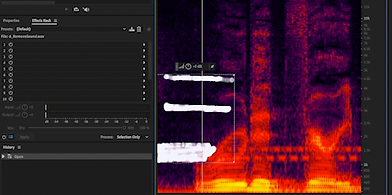
4. Audio Editing & Enhancement Project
Project Overview
Enhanced audio materials for an online digital marketing course to ensure clear, high‑quality sound that supports learner engagement and reduces distractions.
My Role
-
Cleaned and repaired audio
-
Improved voiceover clarity and consistency across all modules.
-
Removed background noise and balanced audio levels.
-
Balanced volume and EQ
-
Synced audio with visual content
Tools Used
-
Adobe Audition
-
ScreenFlow
-
Adobe Premiere Pro
Skills Demonstrated
-
Audio engineering
-
Noise reduction
-
EQ balancing
-
Waveform editing
-
Multimedia production
Instructional Design Approach
Clear audio is essential for learner comprehension. I applied audio‑first design principles to ensure narration was crisp, consistent, and accessible for all learners.
Outcome & Impact
The improved audio significantly increased learner engagement and comprehension, resulting in a more professional and accessible final product.
5. Instructional Video Lesson (Software Training)
Project Overview
This project involved creating a step‑by‑step instructional video to teach learners how to use a specific software tool. The goal was to simplify complex tasks and support visual learners.
My Role
-
Recorded screen demonstrations
-
Edited video sequences
-
Added callouts, highlights, and captions
-
Structured content for clarity and flow
Tools Used
-
ScreenFlow
-
Adobe Premiere Pro
-
Adobe Audition
Skills Demonstrated
-
Software simulation
-
Instructional video editing
-
Captioning & accessibility
-
Visual communication
-
Technical training design
Instructional Design Approach
I used a microlearning structure, breaking the lesson into short, digestible steps. Visual cues and on‑screen highlights supported learners in following along at their own pace.
Outcome & Impact
The video became a key resource in the training program, helping learners quickly build confidence and proficiency with the software.
6. Brand Identity & Packaging Design (Marketing Collateral Suite)
Project Overview
This project involved creating a complete branded marketing package for a fictional company, including a full visual identity system and coordinated print collateral. The goal was to design a cohesive brand look and apply it across multiple assets such as business cards, stationery, and packaging.
My Role
-
Developed three unique branding concepts
-
Designed business cards, letterhead, and envelope layouts
-
Created a custom packaging box design
-
Built 3D mockups using Photoshop templates
-
Prepared print‑ready files and a final presentation PDF
Tools Used
-
Adobe Illustrator
-
Adobe InDesign
-
Adobe Photoshop
Skills Demonstrated
-
Branding & visual identity design
-
Layout and typography
-
Packaging design
-
3D mockup creation
-
Print production preparation
-
Creative concept development
Design Approach
I followed a structured design process, beginning with exploratory concept development and refining the strongest direction into a cohesive brand system. Each asset was crafted to maintain visual consistency through color, typography, and layout. The packaging design was prototyped using a 3D Photoshop template to showcase how the brand would appear in real‑world applications.
Outcome & Impact
The final branding package demonstrated strong craftsmanship, cohesive visual identity, and professional‑quality layout design. The 3D mockups effectively communicated how the brand could be implemented across marketing materials and product packaging.